

How to organise freelance work: clients, time and invoices
Many clients and requests from every direction? Give each client a project, capture requests in one place, measure your time and make invoices recurring tasks.

A client messages you on WhatsApp, another sends changes by email, and a third calls to ask about a deadline you agreed on two weeks ago and never wrote down. At the end of the month you notice you never invoiced a client whose work you finished weeks ago. That is what freelance work looks like when it grows faster than the way you organise it.
The good news is that you do not need a complicated system. A handful of steady habits, kept every week, is enough. Here they are, with a weekly checklist you can copy.
How do you organise freelance work?
Give every client a separate project. Write every request in one place before you decide anything about it. Estimate each task, then measure how long it really took. Turn invoices and follow-ups into recurring tasks with dates, and keep a few hours each day that clients cannot interrupt. A short weekly review then keeps the whole picture clear.
One project per client: the base of organised freelance work
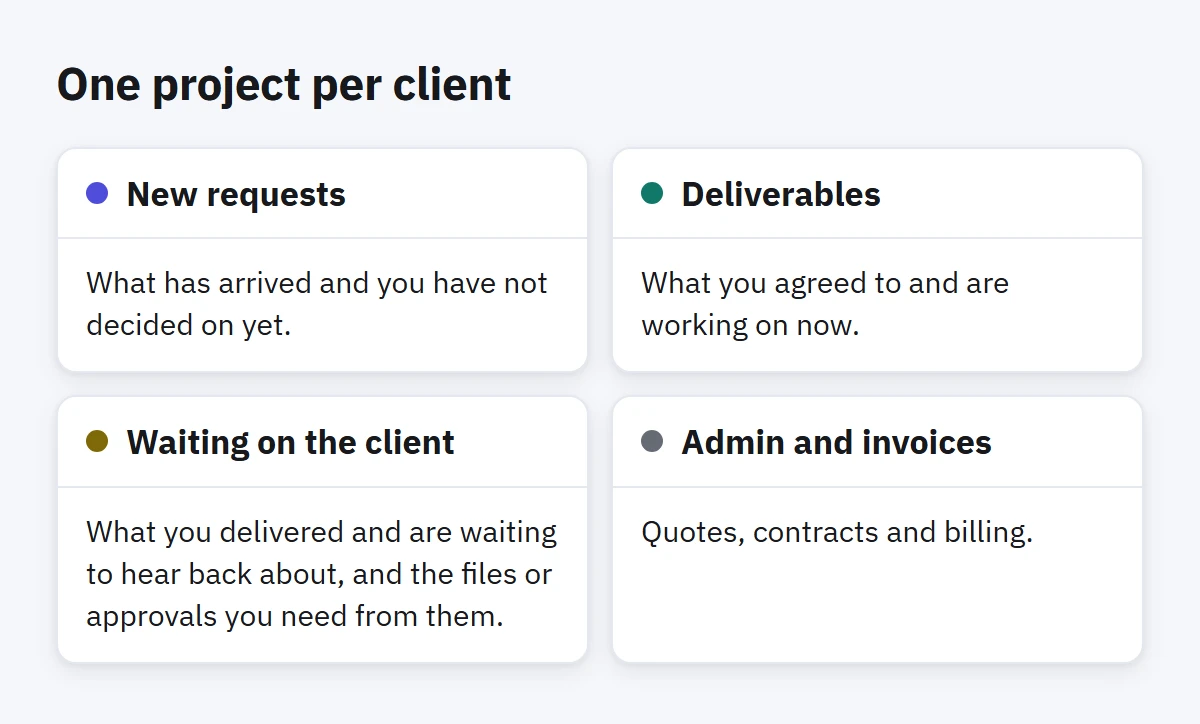
When every client's tasks share one list, you lose two things. You cannot see how much you are carrying for each client, and you cannot work on one client without the others' tasks pulling at you. Give each client a project, with a few lists inside it that fit your kind of work:
- New requests: what has arrived and you have not decided on yet.
- Deliverables: what you agreed to and are working on now.
- Waiting on the client: what you delivered and are waiting to hear back about, and the files or approvals you need from them.
- Admin and invoices: quotes, contracts and billing.
Add one more project for your own business: marketing yourself, updating your portfolio, learning. Nobody asks you for these tasks, which is exactly why they keep slipping unless they have a home.
Capture every request in one place first
Requests will keep arriving through every channel, and you cannot make clients use just one. What you can control is where you write them down. Each time a request comes in, add it to that client's New requests list as one line that starts with a verb, with the date if the client gave one. Then decide about it later, in one sitting: is it part of the agreement, extra work that needs a price, or something you cannot take on?
Keeping capture and decision apart protects you from the most expensive freelance habit: saying "sure" in a chat before you know what the request will cost you. The article Capture fast, decide later explains the method in detail.
Estimate your time, then measure it
Most freelancers price by estimate and never find out whether the estimate was right. If you quoted ten hours for a logo and it took twenty, you worked half of it for free without noticing. The fix is simple: write an estimate on each task before you start, run a timer while you work on it, and compare the two numbers when you finish.
You do not need perfect records. After two months it is enough to know that revisions take you twice as long as you think, or that one client's calls eat a third of their project. Those numbers will improve your next quotes more than any pricing advice.
Invoices and follow-ups are recurring tasks
Anything that comes back on a schedule should not depend on your memory. Make every repeating admin or money job a task with a repeat rule and a reminder:
- Sending invoices: every month on a fixed day, or after each delivery.
- Chasing late payments: every week, going through the invoices that are still unpaid.
- The client report: every week or every two weeks, for clients who need one.
- Renewing subscriptions and tools: every month or every year.
When you deliver something and wait for an answer, add a follow-up task for three days later. A busy client rarely rejects your work; they forget about it. A friendly follow-up at the right time saves you weeks of waiting.
Protect your focus hours from the clients themselves
Each client sees only their own project, so they expect a quick reply at any hour. If you always meet that expectation, you will have no time left for the work they are paying for. Agree on reply times at the start, for example "I answer messages twice a day", and keep two or three hours each morning for one client's work only.
In each focus block, work on a single project. Jumping between three clients in one hour costs you the switch between three different worlds and leaves all their work half done.
A weekly checklist for freelance work
Take half an hour on the last working day of the week and go through this list:
- Empty each client's New requests: decide on every request, and give it a date if it has one.
- Go through Waiting on the client: who needs a follow-up next week?
- Compare time with estimates on the tasks you finished: where did you go over, and why?
- Check your invoices: what you sent, what has been paid and what is late.
- Look at the next two weeks: are two deliveries due on the same day? Do you have room for new work?
- Pick a main client for each day of next week, who gets that day's morning hours.
How to do this in Enjazy
In Enjazy, create a project for each client with its lists inside. When you activate a project, every view shows only that project, so you work on one client without the rest in sight. Capture requests with quick add in one line: Send the second logo draft thu !!! adds a task due on Thursday with high importance. Use a tag such as #waiting for tasks that wait on a client's reply.
Every task has an estimate and a timer. Write the estimate, start the timer when you begin and the task moves to In progress; stop it and Enjazy records the time on the task. The Dashboard (in the Pro plan) compares the time you spent with your estimates and shows each project's progress. For invoices and follow-ups, give the task a repeat such as Every month or Every week and add a reminder. When you complete it, it moves to its next date and stays one task.
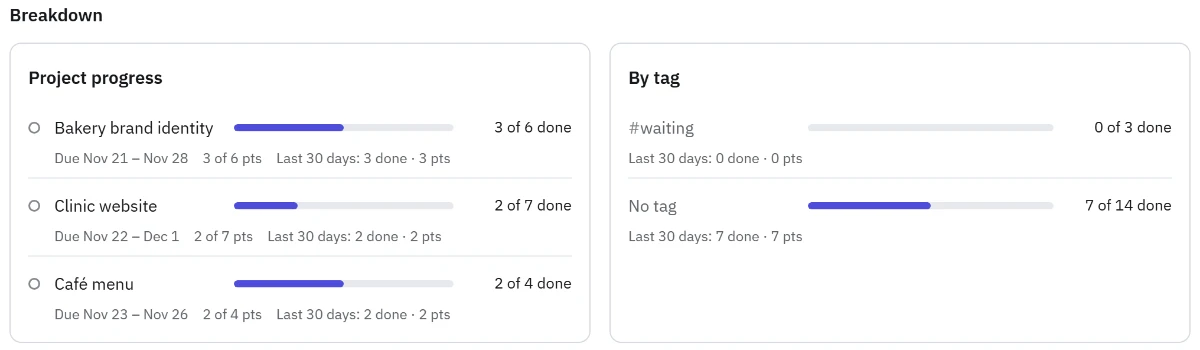
A smart list (in the Pro plan) can gather every task tagged waiting, from all your clients, in one place. If you deliver the same kind of job again and again, such as a brand identity with its usual stages, save one as a template (in the Pro plan) and add it to each new client's list in one step. Focus sessions (in the Pro plan) in the Windows and Android apps help you guard your focus hours, and on Windows the Timer window (also in Pro) keeps the running timer in view while you work in other apps.
If a client wants to follow progress, share a list with them from Sharing on Enjazy Online or your own Enjazy Server; joining is free for them on every plan. Creating a share needs the Pro plan, and letting a client only view, without editing, needs the Team plan on Enjazy Online.
Start this week with one project for your biggest client. Create a free account at the.enjazy.app, or download Enjazy to keep everything on your device without an account, and see the plans when you need the Pro features.