

Recurring tasks: routines that survive a busy week
Bills, weekly reports and car services come back on a schedule. Set them up once as recurring tasks, with dates that suit you, and stop relying on memory.
The electricity bill you remember two days after it was due. The weekly report your manager reminds you about every Thursday. The car service that is three months late. None of these tasks is hard. They just keep coming back, and every time they depend on you remembering them.
Recurring tasks solve exactly this. You write the task once, tell it when to come back, and stop carrying it in your head. Here is how to choose what should repeat, how to set it up and how to keep routines alive when a week gets busy.
What is a recurring task? It is a task that comes back on a fixed schedule: every day, every week, or on a set day each month, such as paying rent or sending a weekly report. You create it once with a repeat rule and a due date, and when you complete it, it moves forward to its next date by itself, so you never have to remember it again.
Which tasks should be recurring tasks?
Not everything that happens more than once needs a recurring task. Use them for things that come back on a schedule you know in advance, and that hurt when you forget them:
- Money: rent, bills, instalments and subscription renewals.
- Work paperwork: the weekly report, the monthly close, timesheets.
- Maintenance: the car service, cleaning the air-conditioner filter, checking the fire extinguisher.
- Dates that matter: birthdays, renewing your ID or passport, a yearly health check.
- Work habits: the weekly review, clearing your inbox every evening.
On the other hand, do not make a recurring task for something tied to an event you cannot predict, such as "follow up when the client replies", or for a vague goal such as "read more". The first needs a single task, added when the event happens. The second first needs turning into a concrete action: "read 20 pages" on Mondays and Thursdays.
Choose the right repeat rule
Most recurring tasks fit one of these rules:
- Every day: for what truly cannot skip a day, which is less than you think.
- Every weekday: for office routines, such as going through your email each morning.
- Every week, on the days you choose: the weekly report every Thursday, exercise on Mondays and Wednesdays.
- Every month: rent on the first, or on a pattern such as the second Tuesday of the month for a regular meeting.
- Every year: renewals and birthdays.
- Every few days, weeks or months: cleaning the filter every three weeks, a check-up every six months.
Think about the end, too. Some routines never stop. Some stop on a known date, such as the end of the school year, and some after a set number of times, such as ten instalments.
Use the date you need, not the official one
A common mistake is to give the task its official deadline. If the last day to pay a bill is the 10th, set your task for the 7th. If your manager expects the report at noon on Thursday, set your task for Wednesday morning. The date on the task is the day you want to do it, and the gap between that and the official date is the margin that protects you in a busy week.
Give the task a time when you can actually act on it, because that is when its reminder reaches you. A reminder to pay a bill while you are driving does not help much. One during your lunch break gives you two minutes to pay it.
Routines that survive a busy week
Routines usually break in the first busy week. You miss one, then another, and it starts to feel as if the routine is over. A few habits help them survive:
- Write a short version of each routine. The weekly review takes thirty minutes; its short version takes ten. In a busy week, do the short version instead of skipping it.
- Bundle small routines into one task. Instead of five small daily tasks for your morning routine, make one task and keep the five steps in its notes.
- Do not make up for missed times all at once. If you missed exercise three times, do not try to train three times today. Do today's and carry on.
- Tie it to a time, not just a day. A routine anchored to a fixed moment, first thing in the morning or just before lunch, lasts longer than one waiting for "free time".
Template: your first ten recurring tasks
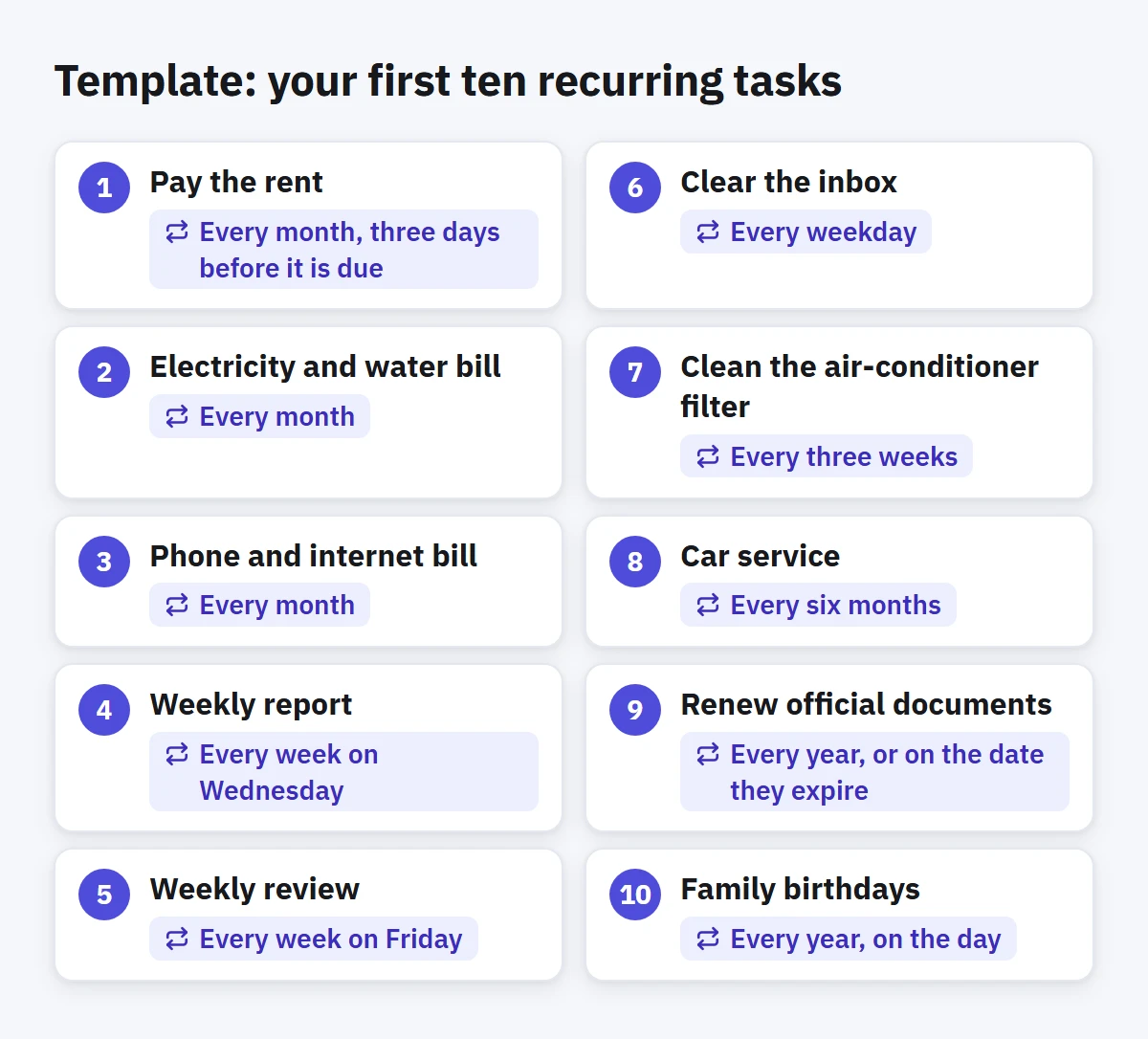
Take ten minutes and create the tasks you already know will come back, then adjust them to your life:
- Pay the rent: every month, three days before it is due.
- Electricity and water bill: every month.
- Phone and internet bill: every month.
- Weekly report: every week on Wednesday.
- Weekly review: every week on Friday.
- Clear the inbox: every weekday.
- Clean the air-conditioner filter: every three weeks.
- Car service: every six months.
- Renew official documents: every year, or on the date they expire.
- Family birthdays: every year, on the day.
Check your recurring tasks every few months
Recurring tasks pile up quietly, like forgotten subscriptions. Every few months, go through them and ask of each one: do I still need it? Is its date right? Do I actually do it, or do I move it every time? A recurring task you always postpone needs a different rule, or deleting. A good moment for this is your weekly review at the end of the month.
How to do this in Enjazy
Add the task as you would any other, with quick add for example: Electricity bill sun #bills. Then open it and choose Repeat: every day, every weekday, every week on the days you pick, every month on a set day or on a pattern such as the second Tuesday, every year, or Custom for a number of days, weeks, months or years that you choose. Then decide when the repeat ends, under Ends: Never, On a date, or after a number of times. A repeating task needs a due date.
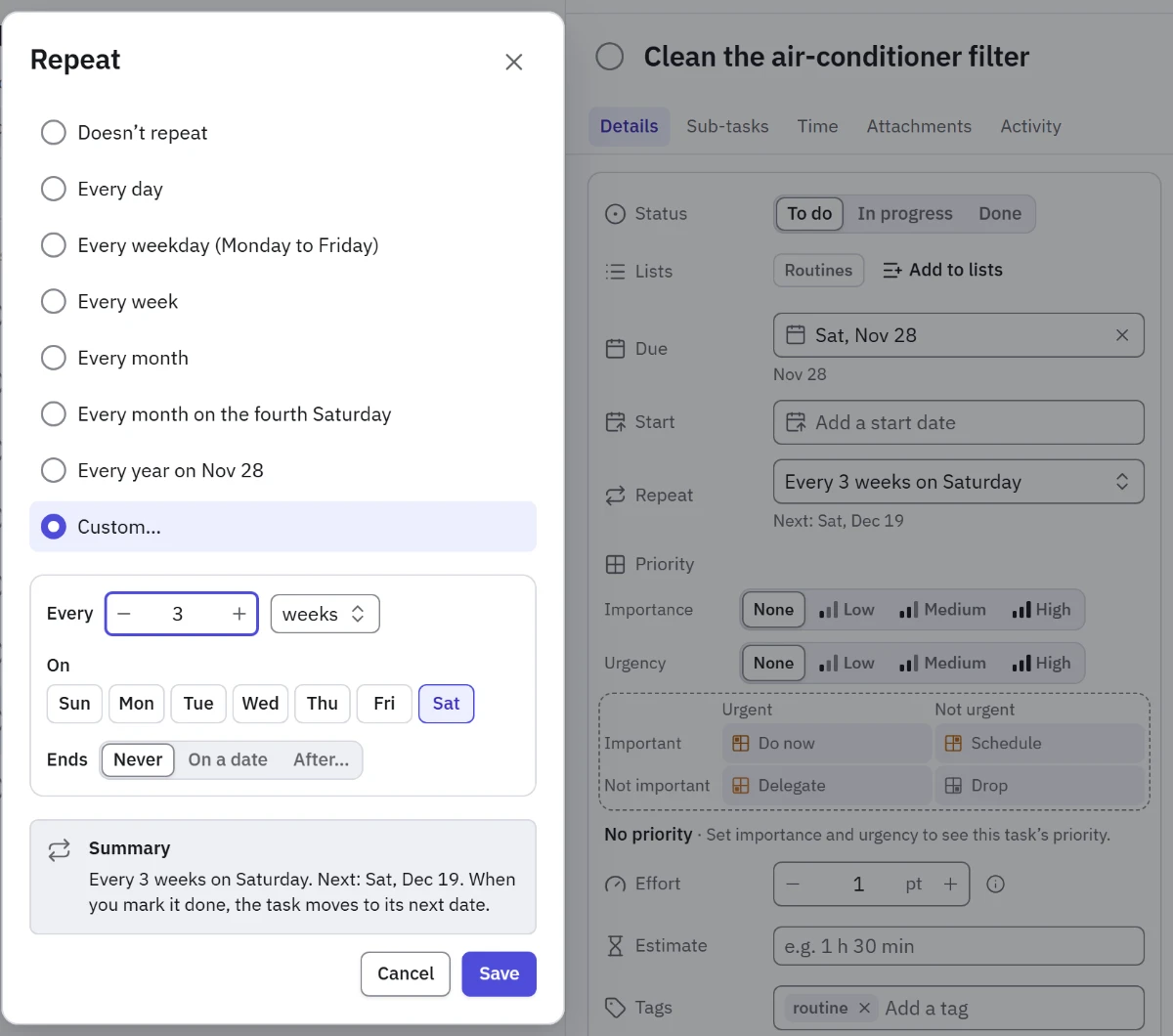
When you complete a repeating task, Enjazy moves it forward to its next date. It is always one task, never a pile of copies, so if you miss a date nothing multiplies: the task simply waits in the Overdue group of Upcoming until you do it or move it.
Reminders reach you when a task is due. On Android, the system schedules them. On Windows, they fire while the app is running, and you can have Enjazy start with Windows in the tray, ready for quick add and reminders.
Give your recurring tasks a tag such as #routine or #bills, then save a smart list (in the Pro plan) that gathers them from every list, so you can see your whole routine in one place when you review it. For a routine with fixed steps, such as the month-end close, save a task with its sub-tasks as a template (also in Pro) and add it to any list in one step. Calendar shows each recurring task on its next due date, and Activity (in the Pro plan) records each time a recurring task moved to its next date.
Set up your first ten recurring tasks today: create a free account at the.enjazy.app, download the apps from enjazy.app/download, or see the plans at enjazy.app/pricing.