

A shared family to-do list that everyone actually uses
Groceries, bills, school forms and chores, in one list the whole family can open. Simple lists, one owner per task and a short weekly check-in.
"Who was supposed to buy the bread?" It is a question asked in a lot of homes, usually at dinner time. The family chat buries requests under photos and greetings, the water bill is always remembered by the same person, and that person ends up carrying the whole household list in their head.
A shared family to-do list takes that load out of one head and puts it where everyone can see it. Here is how to set one up so it actually gets used, not just created.
How do you set up a shared family to-do list? Pick one place everyone can open on their phone, and split it into a few lists: Shopping, Bills, School and Home. Give each task one person who owns it and a date only when it really has one, and look at the list together for ten minutes once a week.
Why the family chat does not work as a to-do list
Chat is good for talking and bad for keeping track. A few problems show up in almost every family:
- Requests disappear. "We are out of rice" is ten messages up by the evening, under a video and three voice notes.
- Nobody knows what is done. Did someone pay the internet bill, or did everyone assume someone else did?
- One person carries the load. Usually one parent remembers the school forms, the car service and the gas bottle. The work is shared; the remembering is not.
A shared list fixes all three. Requests stay until someone ticks them off, done is visible to everyone, and the remembering moves out of one person's head.
How to build a shared family to-do list
Start with four lists, no more
Keep the structure as simple as a fridge door:
- Shopping: groceries and household things, each item a task.
- Bills and payments: rent, electricity, water, internet, school fees.
- School and kids: forms to sign, things to bring, parents' meetings, exam dates.
- Home and repairs: the dripping tap, the air-conditioner service, the curtain that needs fixing.
You can add more later. Most families who start with ten lists stop using them within a month, because nobody remembers where anything goes.
One person per task
A task that belongs to "everyone" belongs to no one. Agree on one person for each task, even when others help. A simple way to show it is to start each task with that person's name, such as "Sara:" or "Khaled:", so anyone can see at a glance who is on what, and whether one person is carrying far more than the rest.
Dates only when they are real
A school form due Sunday has a real date. "Fix the shelf" probably does not. If everything has a date, the list turns red with overdue tasks within a week and people stop trusting it. Leave undated what has no date, and look at it in the weekly check-in.
House rules everyone agrees on
The list works when everyone uses it the same way. Five rules are usually enough:
- Add it when you think of it. If you notice the soap is running out, add it to Shopping right away instead of mentioning it in the chat.
- Tick it when it is done. Mark the task done the moment you finish, so two people do not buy the same milk.
- Ask on the task. A question about a task goes in a comment on that task, where the answer stays.
- Do not delete someone else's task without asking. Move it, comment on it, or ask, but leave the decision to its owner.
- The list is a helper, not a scoreboard. It is there so nobody has to remember everything, not to count who did less.
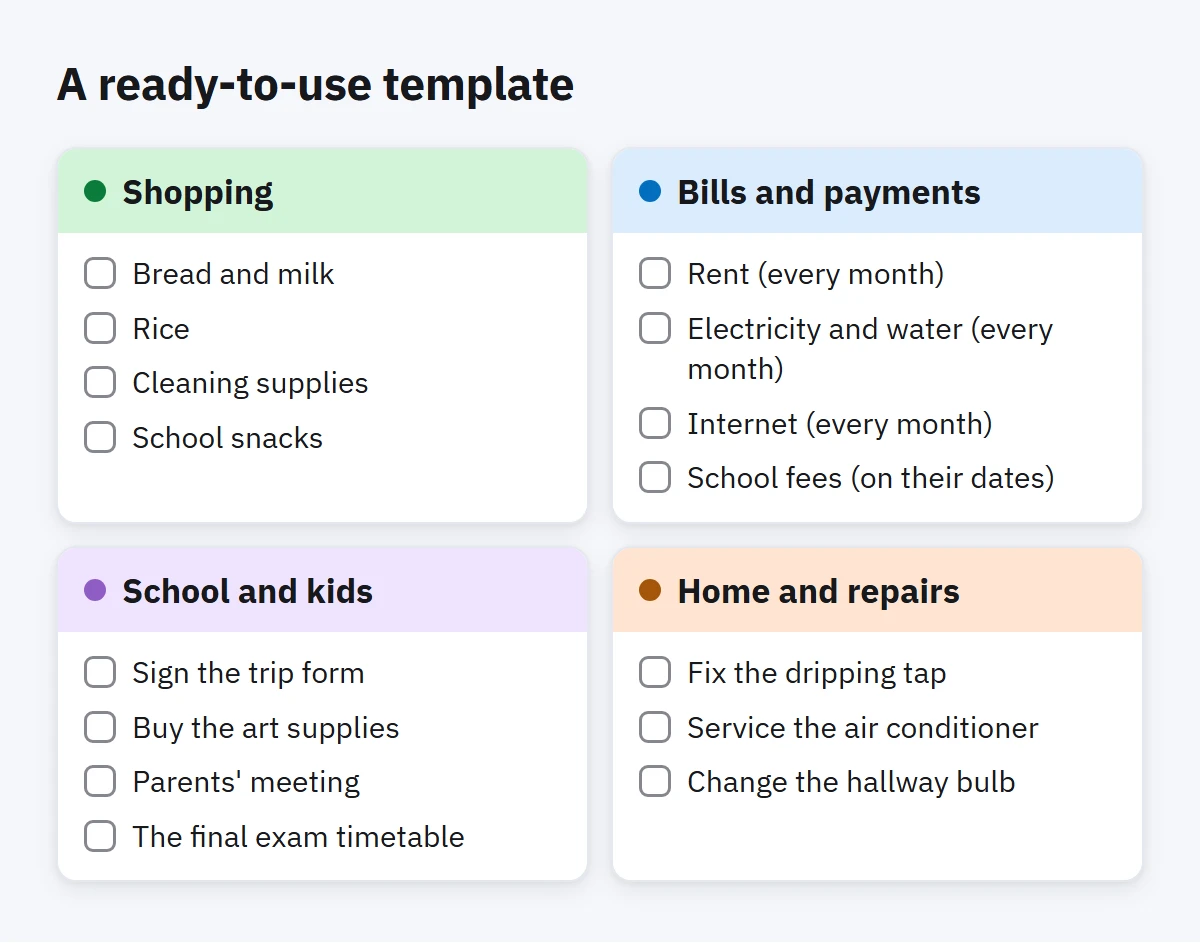
A ready-to-use template
Copy these lists and the first tasks in each, then change them to fit your home:
- Shopping: bread and milk, rice, cleaning supplies, school snacks.
- Bills and payments: rent (every month), electricity and water (every month), internet (every month), school fees (on their dates).
- School and kids: sign the trip form, buy the art supplies, parents' meeting, the final exam timetable.
- Home and repairs: fix the dripping tap, service the air conditioner, change the hallway bulb.
Make the bills recurring tasks once and you will not have to add them again. Our article on recurring tasks and routines explains how to choose the dates.
Kids and the shared list
Older children can own their own tasks: tidying their room, preparing their school bag, feeding the cat. Seeing their name on a task, and ticking it off themselves, often works better than a reminder from a parent.
For younger children, or for relatives who only need to see what is going on, it can be better if they can look without changing anything. Decide together who edits and who only views, and keep the number of editors small enough that the lists stay tidy.
A ten-minute weekly family check-in
Pick a fixed time, Thursday evening or Saturday morning for example, and go through the list together:
- What is done? Clear it away and enjoy it for a moment.
- What is overdue? Decide: do it this week, give it to someone else, or drop it.
- What is coming? Bills, school dates and appointments in the next two weeks.
- Who is carrying too much? Move a task or two if one name is everywhere.
- What is missing? Add anything that only lives in someone's head.
Ten minutes, the list open on one screen, no lectures.
How to do this in Enjazy
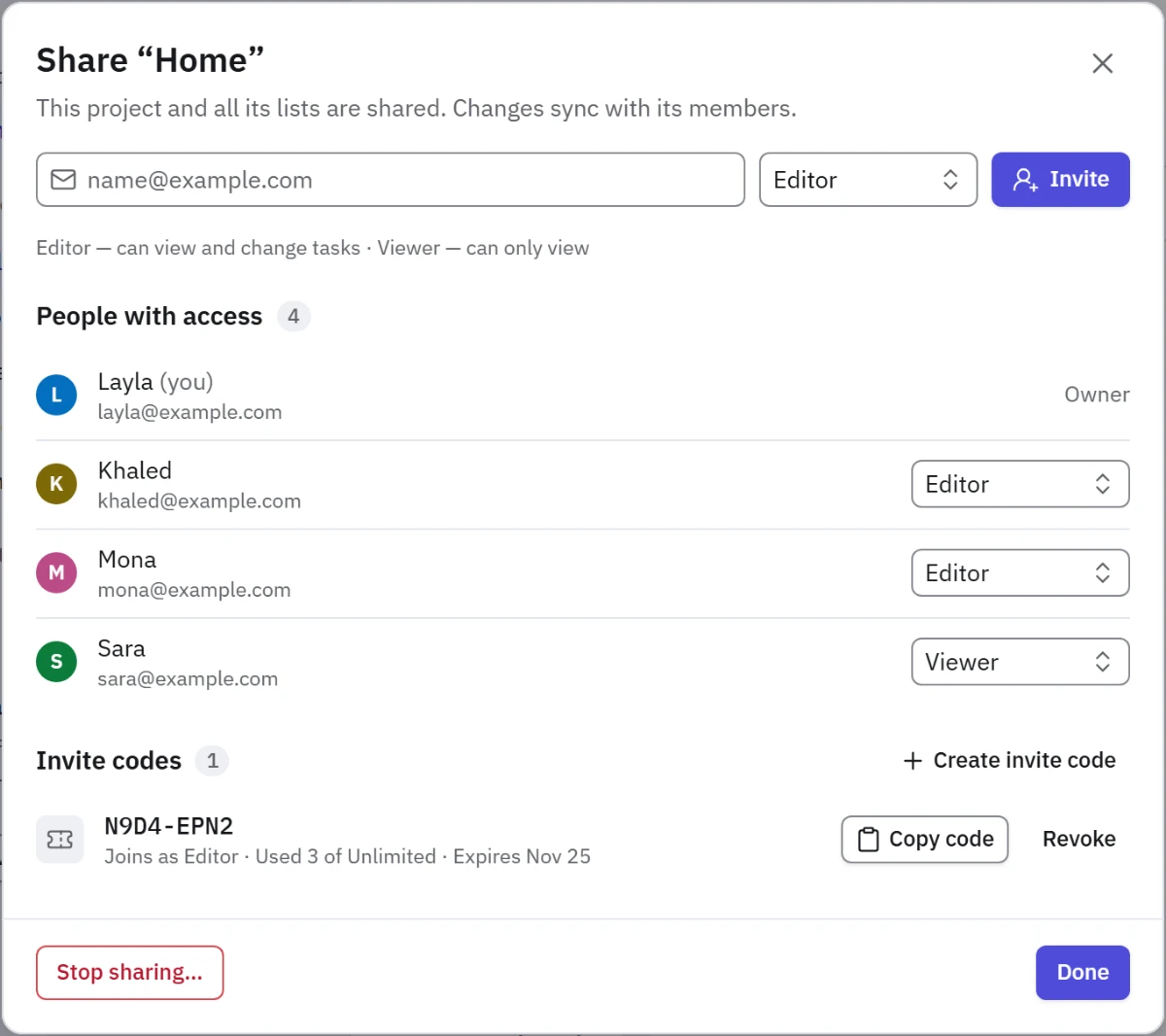
Create a project called Home with the four lists inside it, then share the project from Sharing with an invite link or a join code. Sharing works on Enjazy Online or your own Enjazy Server. Creating a share needs the Pro plan, while joining someone else's share is free on every plan, so the rest of the family can join on the Free plan. On Enjazy Online, confirm your email address before you share.
Each member has a role: the owner manages access, editors can change tasks and viewers can only look. Choosing who can only view needs the Team plan on Enjazy Online, or Pro on Enjazy Server; on Online Pro, everyone joins as an editor. Changes sync to everyone automatically, on Android phones, Windows computers and the web app. Only what you share is visible to the family; your other lists stay your own.
Quick add keeps adding fast: Khaled: Bread and milk today adds "Khaled: Bread and milk", due today, and the whole family sees Khaled's name on it. Make the bills recurring tasks with a reminder, put school dates on Calendar, and use comments for questions. A smart list (in the Pro plan) with one person's name in Contains words shows everything they own across the project, which makes the weekly check-in quicker.
Set up your family's first list this week: create a free account at the.enjazy.app, download the apps from enjazy.app/download, or see the plans at enjazy.app/pricing.