

How to manage a side project with a full-time job
A side project needs a method that fits tired evenings: fixed weekly slots, a next step always written down and milestones you can reach in weeks.
You get home from work at seven, and the project you have been thinking about for months is still waiting: a small online shop, an app, a book, a course. You open your laptop, spend half an hour remembering where you left off, then close it because you are tired. By the end of the week, the project has not moved.
It is rarely a lack of will or talent. What is missing is a method that fits the little, tired time a full-time job leaves you. Here is a practical way to manage a side project next to a full-time job, in a few hours a week, that survives the busy weeks too.
The short answer: to manage a side project with a full-time job, book two or three fixed slots a week of one to two hours each, and end every slot by writing down your next step, so the next session starts without hesitation. Split the project into short milestones of a few weeks each, and park anything that does not serve the current one.
Why side projects stall
Side projects rarely die because the idea is bad. They stall for small reasons that repeat every week:
- Every start is expensive. Days pass between sessions, so the first part of each one goes to remembering where you were and what you meant to do.
- The project is big and vague. "Launch my shop" is not something you can start on a Tuesday evening, so you drift to something easier.
- It gets your worst hours. The project gets whatever energy is left after a full working day, and that is not much.
- Nobody is waiting for it. No manager, no client, no deadline, so it is easy to push it back another week.
Each of these has a simple fix, and that is what the rest of this article covers.
Book fixed time for your side project
A project you work on "when there is time" will never find any. Choose specific slots in your week and treat them like a doctor's appointment: you cancel only for a real reason.
Be realistic. Three to five hours a week is enough for visible progress if you keep it up for months. The ten hours you promise yourself in week one usually collapse by week three. Patterns that work for many people:
- Two evenings a week, an hour and a half each, at a fixed time after dinner.
- A weekend morning, two hours before the family day begins.
- An hour before work, for people who think more clearly early in the day.
Pick the slots where your energy is highest, not just where your calendar is emptiest. One clear hour in the morning can be worth three tired ones late at night.
Always leave the next step ready
This is the most important habit in the whole article: never end a session without writing down the next step clearly. Not "finish the website", but "write descriptions for the first three products". When you sit down next time, you know what to do in the first minute, and you start working instead of spending half an hour remembering.
Two rules make a good next step:
- It fits in one session. If you cannot finish it in an hour or two, it is still bigger than a step.
- It starts with a clear verb. Call, write, design, compare. Not a topic like "marketing".
It sometimes helps to stop in the middle of something you know how to continue, rather than at the end of it. A sentence you already know how to finish is the easiest way into your next session.
Split your side project into short milestones
A big dream needs small milestones. A milestone is a visible result you can reach in three to six weeks: "the first ten products listed in the shop", "chapter one written and reviewed", "a first version of the app running on my phone". Each milestone breaks into steps that fit in one session.
Work on one milestone at a time. A side project cannot afford several fronts: its few hours get spread over everything, and nothing gets finished.
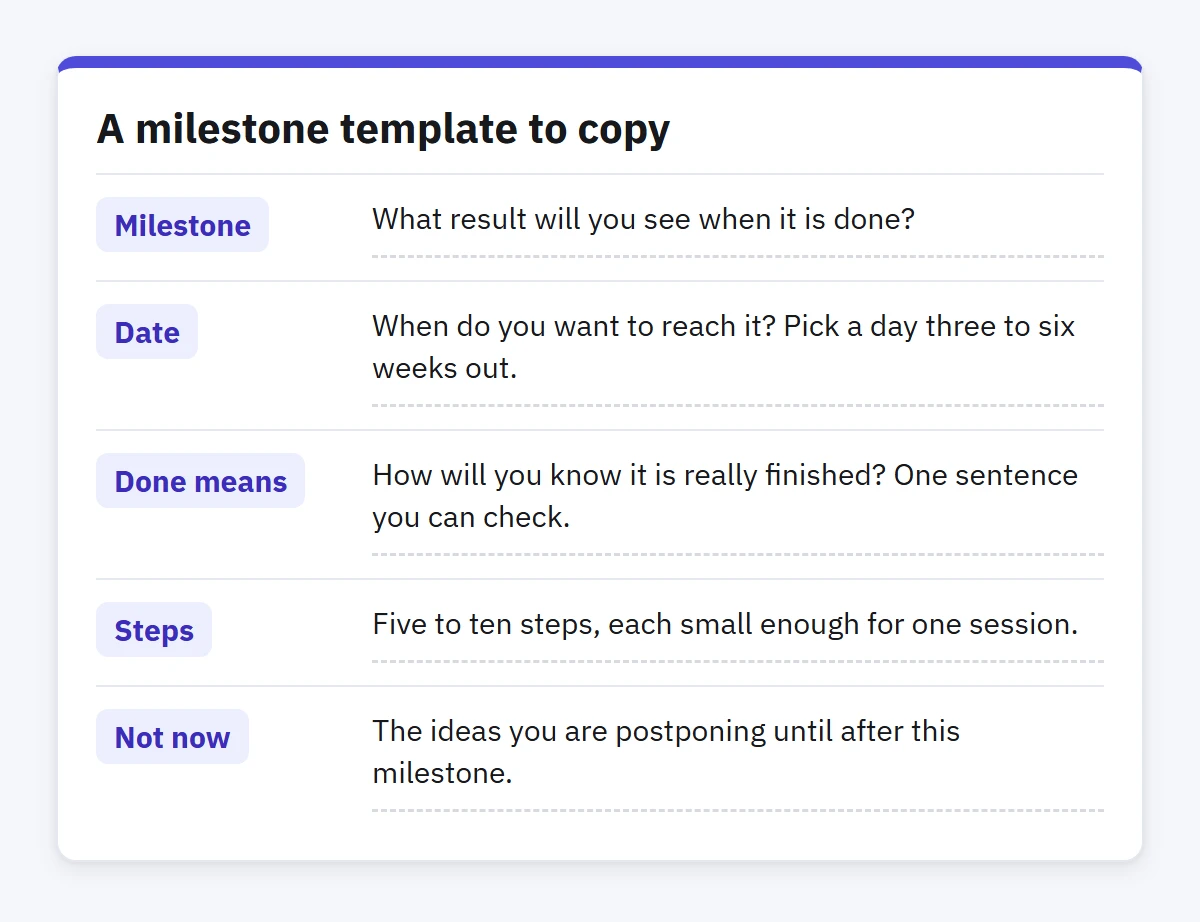
A milestone template to copy
- Milestone: what result will you see when it is done?
- Date: when do you want to reach it? Pick a day three to six weeks out.
- Done means: how will you know it is really finished? One sentence you can check.
- Steps: five to ten steps, each small enough for one session.
- Not now: the ideas you are postponing until after this milestone.
Say "not now" often
New ideas will keep coming: an extra feature, a nicer design, another platform to publish on. Most of them are good, but they do not serve the current milestone. Do not delete them, and do not act on them. Write them in a separate list called Later, and come back to it when you choose your next milestone.
The same goes for commitments. Every new commitment outside your job comes out of the same few hours, and it is fine to decline some things until you reach your milestone.
Protect your job and your energy
A side project is a long run, not a sprint. Do not work on it during working hours, and do not steal from your sleep week after week. Tiredness eats into the job and the project alike.
You will have busy weeks with no room for your usual sessions. Do not stop completely; keep a small version going instead: twenty minutes a week to look over your list and finish one small step. Those minutes keep the project alive in your head, and make coming back far easier than restarting after a month away.
Once a month, take a quarter of an hour to ask: is the current milestone getting closer to done? Is the project still worth my time? If you want a broader habit, the weekly review has room for your side project and your job together.
How to do this in Enjazy
Create a project in Enjazy for your side project, with two or three lists inside it, such as Current milestone and Later. When your session starts, activate the project so every view shows only its tasks, and your job's tasks stay out of sight while you work on it. Switch back when you are done.
To book your fixed time, create a task called Project session that repeats on the days you picked, say every Sunday and Wednesday, and give it a time and a reminder. When you complete it, it moves to its next date and stays one task. In Calendar's Week view it sits at its hour, so you can see where the project falls in your week.
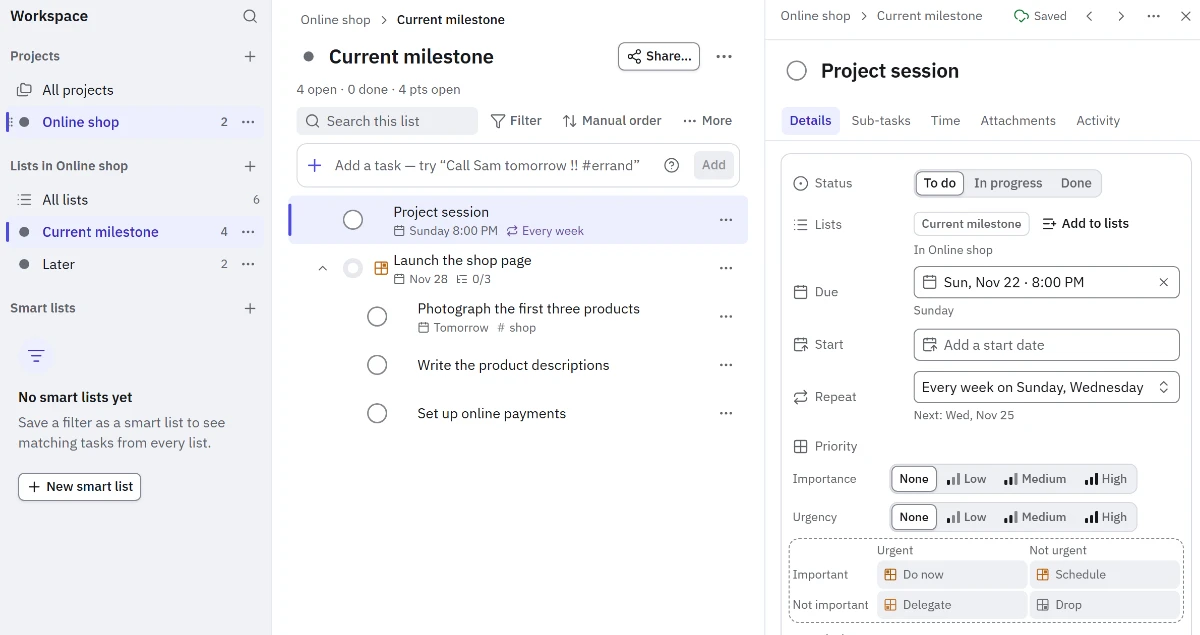
At the end of every session, add your next step with quick add: Photograph the first three products thu #shop adds it due on Thursday with the tag. On Windows, Ctrl Shift Space lets you capture it from anywhere, along with any Later idea that comes to you in the middle of a workday.
Make each milestone a task with a start date and a due date, with its steps as sub-tasks underneath, so the milestone completes on its own when you finish its last step. Give each step an estimate and start its timer when you work on it, to learn how long your steps really take. The Dashboard (in the Pro plan) compares time spent with your estimates, and focus sessions (also in Pro) in the Windows and Android apps help you give your short hour to the project alone.
Start today: download Enjazy and work on your device without an account, or create your Enjazy Online account at the.enjazy.app to have your project on your computer and your phone. You can see what each plan includes at enjazy.app/pricing.